



Summarise with AI:



Work order management involves creating, assigning, tracking, and resolving tasks across maintenance shops. Traditionally, work order management in the MRO industry has been highly manual. Major MRO operators still rely on legacy software and heavily manual processes, including paper forms, spreadsheets, and emails. As a result, they come across issues that stem from a semi-digital environment.
Not to mention, this industry is notorious for relying on analogue methods in the age of artificial intelligence. The time the team generally spent on information exchange could be better spent on critical work.
The traditional methods are not only time-consuming, but also susceptible to data-entry errors. These pitfalls limit visibility into maintenance histories.
Cloud-based computerized maintenance management systems (CMMS) can help there. This software is tailored to automate routine tasks, handle and cross-exchange data and information at scale. CMMS is a widely adopted, proven system across industries used to build a streamlined workflow.
You can use CMMS software alongside other work order management systems to build a centralized view of your data. This makes tracking asset condition, maintenance history, and performance analysis painless. This data drives predictive maintenance and optimizes asset lifecycle management.
Benefits of work order management
McKinsey estimated that, by 2024, about one hour of daily work activities had the technical potential to be automated, with this potential increasing to up to three hours per day by 2030 as technology continues to advance.
Companies using effective work management systems using technology and following standard practices are likely to manage resources more efficiently. Furthermore, work management software makes it straightforward to keep everyone on the same page.
This is a common challenge among industries such as MROs. This practice dramatically elevates both field and facilities management.
- Routine tasks and work updates take less effort.
- Teams stay on the same page, and tracking becomes easier.
- Managers can see which tasks are pending, completed, or ongoing without repeatedly contacting assigned personnel.
- History, logs, and records are easier to maintain for audit and compliance.
If done well, it reduces the daily friction of paper job cards and disconnected spreadsheets, without full-scale ERP implementation. Now we look into how aviation work order management should work in practice, what managers should prioritize, and how it can improve traceability, turnaround control, and audit readiness.
What is aviation MRO work order management?
It helps management align maintenance activities with the company’s goals. In simple terms, it is a structured— documented or digital—record containing all the mandatory and crucial details related to maintenance and service activities, such as work order number, asset information, description of the problem, etc.
For industries such as MRO, which operate in a regulated environment, it helps owners build an audit-ready record for compliance and future reference. Plus, it provides great control over the maintenance process.
Work orders are created in response to work requests: a formal submission to maintenance management that alerts them to an issue requiring their attention. Work order requests can include maintenance needs, repairs, or services.
Looking specifically at MRO, a work order is created when maintenance work needs to be carried out. It records the task, whether it is an inspection, repair, or other services, who is accountable, how to carry it out, and so on.
The process is not straightforward without digital workflow
When information is decentralized, it creates an administrative burden on organization.
More recently, a 2026 survey of UK small-business owners found they spent an average of 8 hours per week on repetitive administrative tasks they believed could be handled differently.
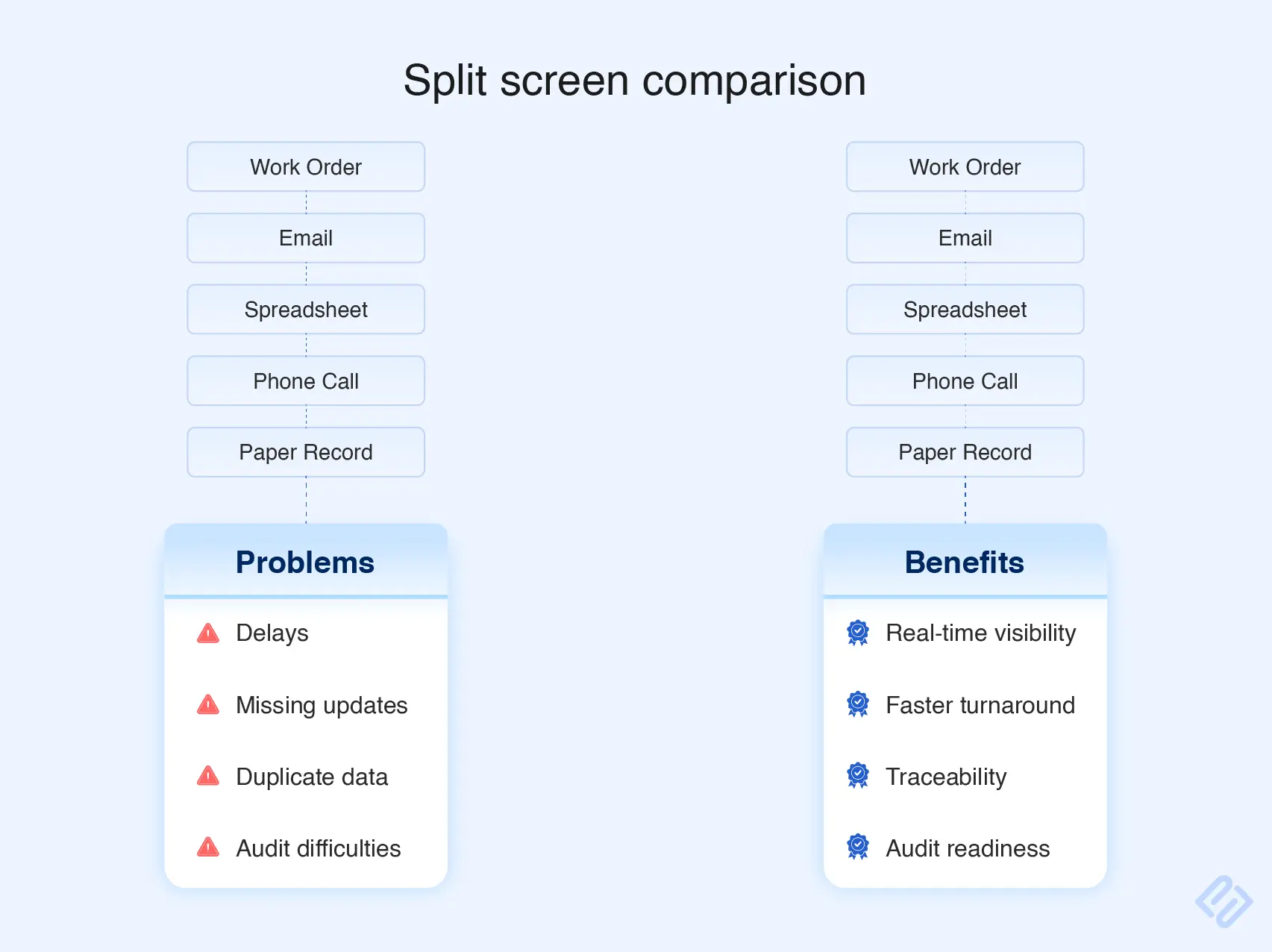
One challenge that is unique to MRO is that, in a traditional MRO environment, one team may manage the work order, another may handle parts information, and yet another may have access to critical information. This issue is inherent in traditional spreadsheet-based and legacy software systems, where centralizing information is neither easy nor efficient.
Information flows through manual sharing, update requests between team members, and team members maintain records in separate systems, creating delays and limiting visibility across teams. Someone must piece all the information together before the work can move forward.
In the aviation industry, a work order may need to connect that maintenance activity with related information, such as:
- Aircraft registration
- Serial number
- Operator
- Work scope
- Component serial numbers
- Serviceability status and so on.
The idea is simple. Those with the proper permission don’t want to waste their time searching for information residing in multiple systems and is maintained by different department. This becomes a particularly crucial factor for MRO shops that are relatively small because they have to do everything from talking to customers to being compliant.
Aviation work orders need more control than standard facilities or manufacturing maintenance tickets.
| Operational area | What can go wrong without controlled work orders | What a digital workflow improves |
|---|---|---|
| Job status | Supervisors rely on calls, whiteboards, or paper folders to know what is happening | Live visibility of planned, in-progress, blocked, inspected, and completed tasks |
| Technical records | Job cards are misplaced, handwriting is unclear, or documents are filed late | Searchable, structured maintenance records attached to the correct aircraft or component |
| Parts traceability | A part is available physically but not identified, reserved, or linked to the job | Better visibility of stock, usage, documentation, and material requirements |
| Labour control | Hours are recorded after the fact or against the wrong task | Accurate labour capture against specific work orders and activities |
| Sign-offs | A signature, inspection, or approval is missed near the end of the job | Clear controls for outstanding tasks, approvals, and release blockers |
| Customer updates | The customer repeatedly calls for progress information | A clearer internal view of status, delays, findings, and expected completion |
| Audit preparation | Teams search through binders, spreadsheets, emails, and scanned PDFs | Faster retrieval of job history, changes, parts records, and sign-off evidence |
Let’s understand this through a simple example what standard work-order process may combine.
Assume a component arrives at your repair shop for maintenance. The planner first records all the mandatory details related to the work order. Then they would list down the requirements explicitly in a format described in the rule book. If may forward requirements to cross-departments.
Now consider what happens when this interaction is verbal or requirements are recorded in spreadsheets maintained by individuals. The trail can become murky in day-to-day work or during an audit. Ask these questions to your team:
- What was requested from inventory?
- When was the request made?
Can they quickly answer without searching through documents or asking a colleague who knows the job? If no, then it means your current system may not be giving them the visibility they need.
One can address this challenge without overhauling their current system. By using SaaS MRO software with work-order capabilities, such as PrioxiMRO, you can link the information needed to maintain a transparent audit trail and quickly find what you need without manually searching through different records or asking colleagues.
The maintenance tasks, assigned personnel, labour recorded, parts issued, task status, findings, inspections, and supporting documents can all be linked to that job.
For example, current MRO platforms allow a work order to be created, assigned, and tracked through completion while recording technician labor, parts used, task progress, and supporting documentation. Some also link the work order directly with inventory and purchasing data, so a part requirement does not have to be managed separately from the maintenance job.
As the work moves forward, the record changes with it. A finding can be added to the job, additional work can be recorded, aircraft parts can be issued, and completed tasks can be signed off. This gives authorised users a way to check the current state of the job and review the information created throughout the process without having to piece it together from separate records.
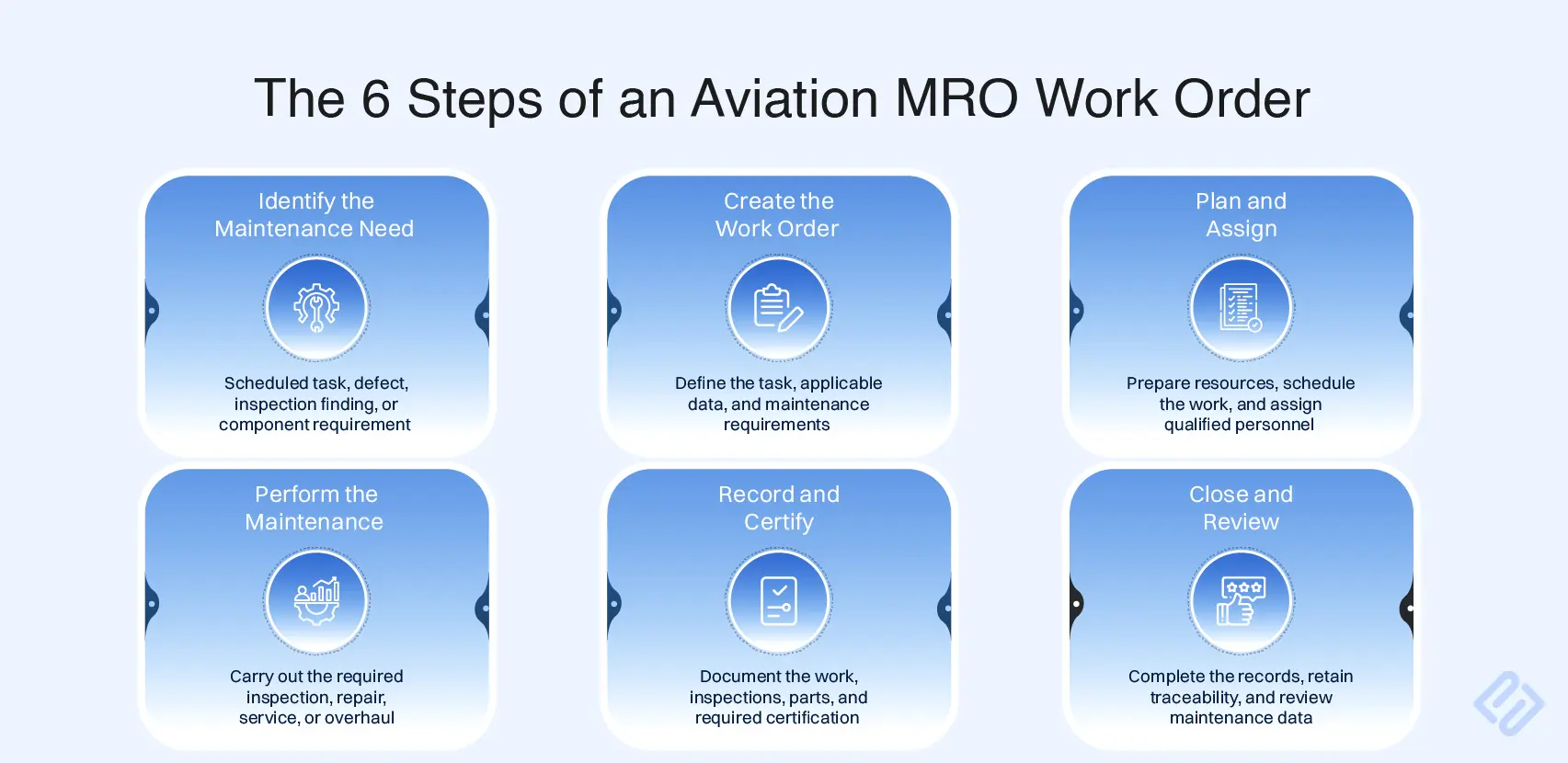
An example of the aviation work order lifecycle
Note: The terminology may differ between MRO shops, but the logic should remain consistent.
1. Raise the work order
A work order can originate from a scheduled maintenance input, or a reported defect or technical finding, etc.
At this stage, an MRO operator generally captures the asset information, work scope, priority, target date, and relevant references such as maintenance instructions.
2. Plan the job
Planning is where small MROs win or lose turnaround time. Before a technician begins, the planner or supervisor lays out the groundwork for the activity. This may include standard instructions for the assigned technician or team to follow (or applicable work cards), estimated hours to complete the task, inspection requirements, required parts, etc.
3. Execute and capture work
For a small Part-145 MRO software, a mobile-friendly system can be very useful because technicians and supervisors are generally moving between the workshop, stores, and inspection areas. Instead of leaving the work to check a workstation or ask for the latest information, you can share and assign work orders and relevant task information where the work is being carried out. Mobile-friendly MRO software is becoming more common across industries, as smartphone become more capable.
4. Inspect, sign off, and review
The workflow must show the exact status of the job, beyond just “open and closed” status. For example, a supervisor should be able to see that what work is done, what required is still pending. They can immediately see what the blocker is without calling around. Later, if an auditor asks who completed what activity, the work order would provide the transparent work order trail.
5. Close the work order with usable data
After a job is done, the information collected during the activity should be helpful to the team to review later. This is called operational intelligence, which further makes it easy to understand maintenance work for managers, planners, technicians, and aviation authorities. The information available may include, among other things:
- Actual labour
- Material use
- Findings and important details
- Customer-approved changes
- Final inspection
- Completion status
- Documentation
Features small MROs should prioritize
Choose software that is built around your business needs. Feature lists should be a secondary consideration, not the key driver of the decision, if your requirements are unique. These are the common features to look for in software when evaluating for work order management.
| Capability | Why it matters | What to verify during a demo |
|---|---|---|
| Digital work orders and job cards | Creates a controlled record for scheduled and unscheduled work | Can the team create, assign, update, and close jobs without duplicate data entry? |
| Aircraft and component records | Links all work to the correct aircraft, serialised component, or customer asset | Can users retrieve previous work, associated documents, and repair history quickly? |
| Task templates | Makes recurring inspections and common repair work more consistent | Can the shop build reusable task packages with steps, labour, materials, and checks? |
| Digital sign-offs and audit trail | Supports accountable, searchable maintenance records | Does the system show who did what, when, and what changed? |
| Parts and inventory integration | Prevents maintenance plans from being disconnected from material reality | Can work orders show stock, reserve parts, record use, and flag shortages? |
| Labour and time tracking | Helps manage utilisation, costing, and workload | Can labour be logged against the relevant job and task at the point of work? |
| Mobile access | Reduces paperwork and delayed data entry on the hangar floor | Can technicians access work packs, record findings, and capture evidence on a tablet? |
| Status and workflow visibility | Helps supervisors identify blockers before the deadline is missed | Can users see tasks awaiting parts, inspection, approval, or customer input? |
| Reporting and job costing | Turns maintenance history into commercial and operational insight | Can management compare estimated versus actual labour, materials, and turnaround? |
| Security and data backup | Protects sensitive maintenance, customer, and commercial records | Is the vendor clear about access control, backups, security monitoring, and hosting? |
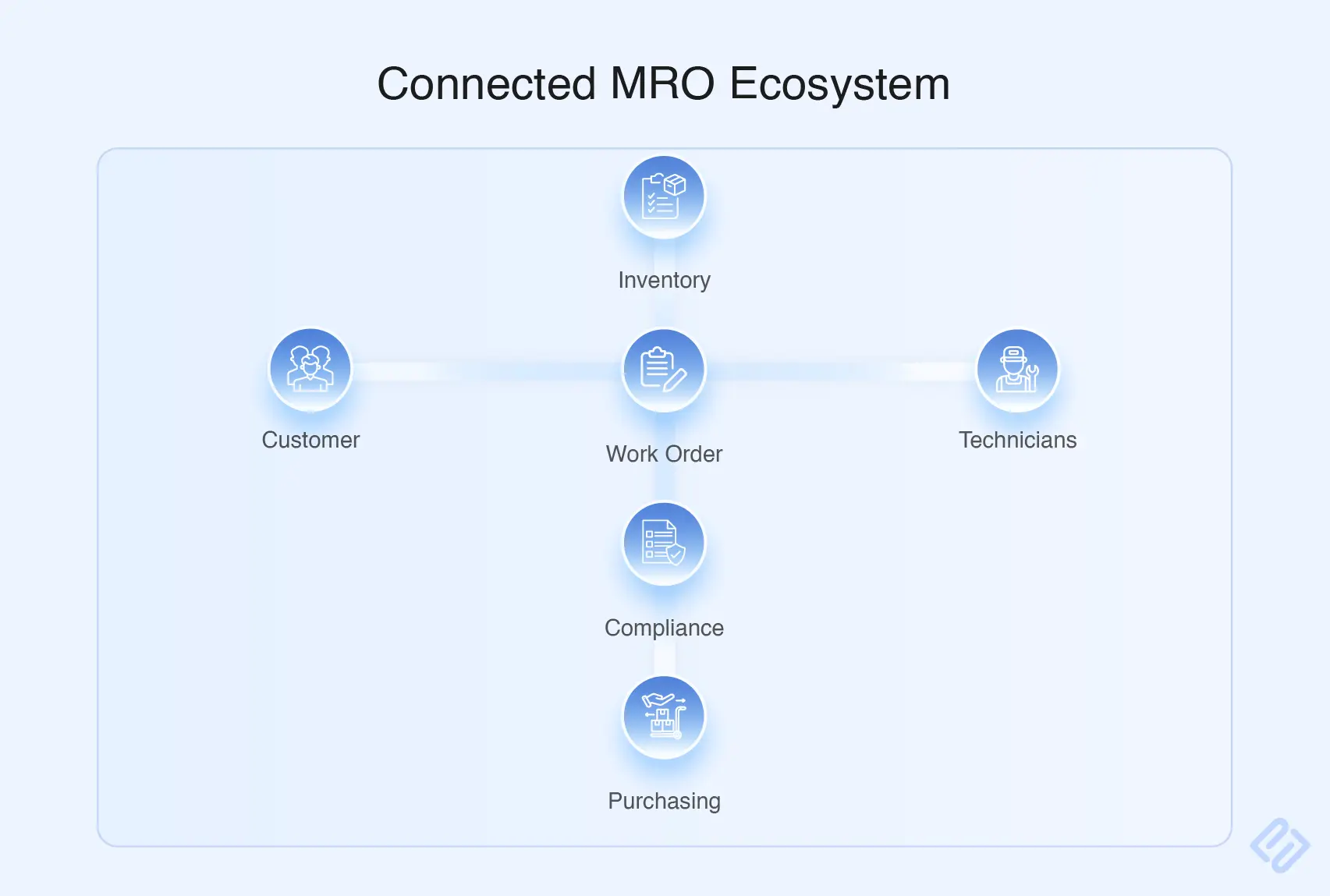
The most effective systems connect work orders to inventory, purchase orders, vendor data, technician activity, and task progress. That connection helps teams plan around actual material and labour constraints instead of discovering them after the job has started.
A work order and inventory should not operate separately
If technicians do not know whether the necessary parts are available, they must rely on phone calls, personal knowledge, and manual stock checks. This process should have been avoided with better planning.
Choosing MRO software for a small repair station
Small maintenance organisations should select software based on their actual operating model—not the feature checklist of a major airline or global MRO group.
Start with your biggest operational bottlenecks
Before arranging software demos, identify the points where work repeatedly slows down:
- Are job cards incomplete or difficult to locate?
- Are technicians waiting for parts?
- Is job status unclear until the end of the shift?
- Are sign-offs regularly chased at close-out?
- Is estimating labour and material cost difficult?
- Are customer updates taking too much office time?
- Is audit preparation dependent on manually collating records?
- Are spreadsheets becoming the unofficial source of truth?
The right platform should solve these specific problems. It should not require the shop to change every process simply to match the software.
Prioritise usability over feature volume
Technicians, planners, stores staff, and certifying staff must use the system. If task updates travel through the organization like a relay race with too many handoffs, the interface is not user-friendly and clean, users are highly likely to go back to informal notes and conversations.
Look for a system that is simple enough to support adoption while still providing the structured records and controls required by the MRO.
Evaluate the full cost of ownership
The monthly software price is only one part of the decision. Ask vendors about:
- Setup and configuration costs
- Data migration support
- Training for technicians, planners, stores, and managers
- Ongoing support
- Feature limits or module costs
- Storage, user, or transaction charges
- Integration with accounting, purchasing, or existing tools
- Security, hosting, backups, and data export options
.webp)
Everything we do—or prefer not to do, it comes with a cost. A small shop should also consider the cost of doing nothing.
As modern cloud-based MRO systems become a central and convenient source of truth for work orders management, companies solving the modern problem with stone-age techniques are simply creating a more room for error.
Choose a system that can grow with the shop
A small MRO may begin with basic work-order control, digital job cards, inventory visibility, and records. As it grows, it may need more structured quoting, customer approvals, purchasing, financial integration, component workflows, reporting, or multi-site coordination.
The ideal platform provides a manageable starting point and the ability to expand when the business needs it—without a disruptive replacement project.
How PrioxiMRO is built around Part-145 work order management workflow
The software is designed for small and growing Part-145 aviation MROs that need more control than paper, spreadsheets, and disconnected tools can provide—without the cost of a full enterprise ERP. A connected PrioxiMRO workflow binds:
- Digital work orders and task records
- Maintenance planning and progress visibility
- Aircraft and component history
- Parts, inventory, and material tracking
- Technician activity and controlled digital sign-offs
- Searchable maintenance documentation
- Audit-ready records and user-level traceability
- A configurable setup that reflects how the repair station already operates
The objective is to give the maintenance team a reliable process, while reducing the manual administration. For a Part-145 organisation, that means less time searching for paperwork and more time focused on maintenance execution.
Final Takeaway
In simple words, work order management is an operational control problem. If the software doesn’t support the environment where the right information is available to the right people at the right time, it is of no value.
Today, many small and mid-sized Part-145 organizations struggle with scattered data, which can hinder their day-to-day workflows, let alone their transformation initiatives.
When evaluating MRO software, ask a simpler question: Will this system remove friction between your team?
In aviation, knowing what was done is important. Knowing who did it, why, what changed, what used, is what makes an MRO shop ready for an era where aviation is becoming increasingly becoming connected and complex.